이벤트 라우팅
이벤트 발생 시에 컨트롤의 하위 또는 상위로 전달되는 것. 여기서 하위 또는 상위는 Element Tree를 기준으로 한다.
이벤트 라우팅은 `버블링(Bubbling)`, `터널링(Tunneling)`, `다이렉트(Direct)` 이벤트로 분류할 수 있다.
- 버블링(Bubbling): 이벤트 원본 요소에서 루트 요소(일반적으로 Page, Window)로 이벤트 발생
- 터널링(Tunneling): 루트 요소에서 원본 요소로 이벤트 발생
- 다이렉트(Direct): 원본 요소에서만 이벤트 발생
WPF의 이벤트 라우팅 모델은 자동으로 이벤트를 상위 객체로 라우팅 시킨다. (=> 버블링)
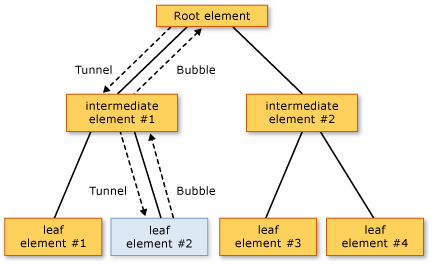
위 트리 그림에서 leaf element #2는 `PreviewMouseDown`, `MouseDown` 이벤트의 소스다.
leaf element #2에서 마우스를 누른 후 이벤트 처리 순서는 아래와 같다.
- Root element의 `PreviewMouseDown` 터널링 이벤트
- intermediate element #1의 `PreviewMouseDown` 터널링 이벤트
- leaf element #2의 `PreviewMouseDown` 터널링 이벤트
- leaf element #2의 `MouseDown` 버블링 이벤트
- intermediate element #1의 `MouseDown` 버블링 이벤트
- Root element의 `MouseDown` 버블링 이벤트
public delegate void RoutedEventHandler(object sender, RoutedEventArgs e);RoutedEventHandler 대리자는 이벤트를 발생시킨 객체와 이벤트 핸들러를 호출한 객체에 대한 정보를 제공한다.
여기서 이벤트를 발생시킨 객체는 RoutedEventArgs의 `Source`프로퍼티이고, 핸들러를 호출한 객체는 `sender` 파라미터이다.
이벤트가 Element Tree에 통해 라우팅 되는 과정에서 이벤트를 발생시킨 객체인 `Source`는 변하지 않지만 `sender`는 계속 변하게 된다. 위 다이어그램의 이벤트 처리 순서에서 3번과 4번은 `Source`와 `sender`가 동일한 객체이다.
👩💻 예제

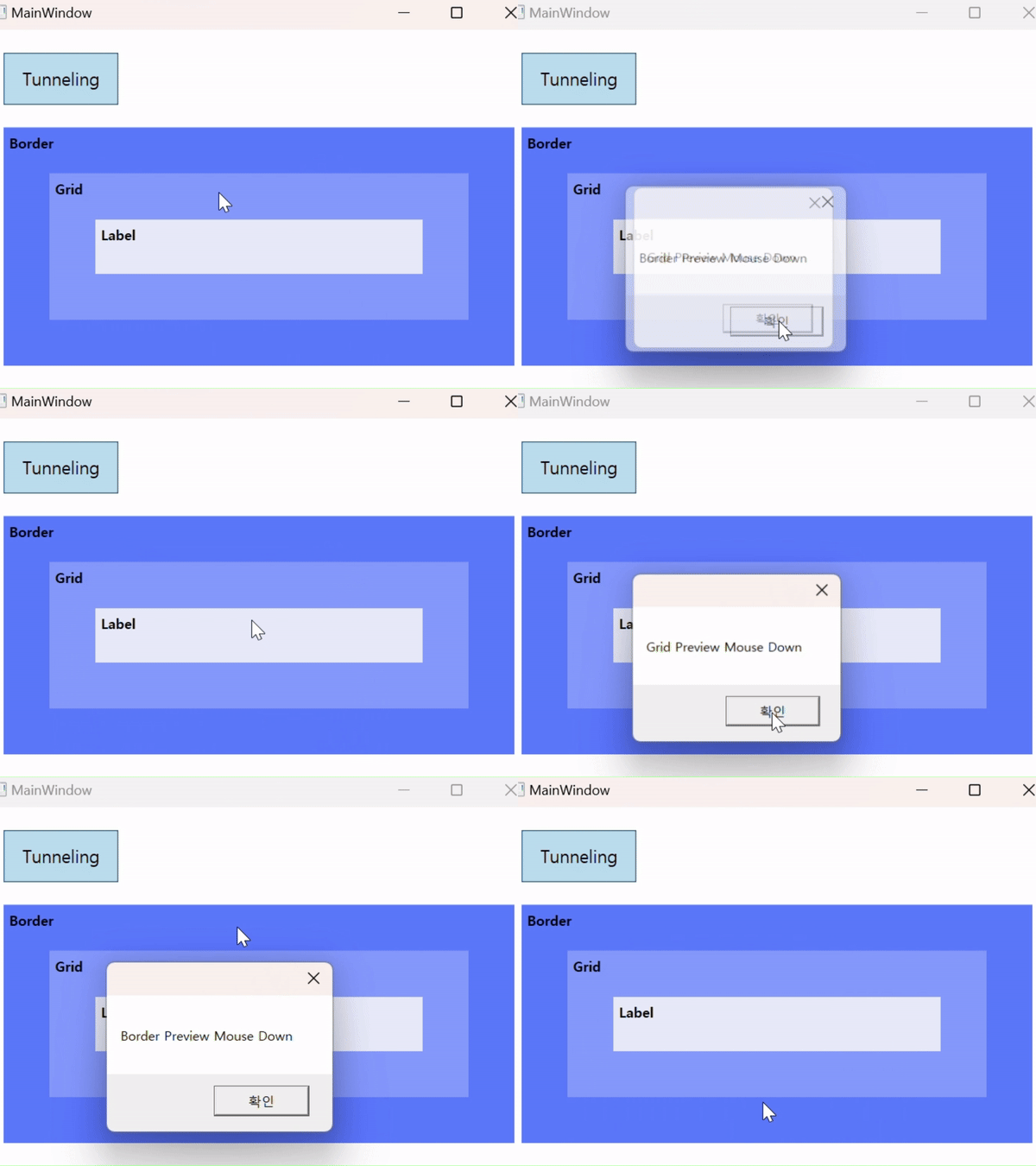
- 첫번째 row는 버블링 혹은 터널링 테스트 모드로 변경할 수 있는 토글버튼 위치
- 두번째 row는 `Border > Grid > Label` 구조의 레이아웃이며, 각각 `MouseDown`, `PreviewMouseDown` 이벤트가 ViewModel의 커맨드와 바인딩 되어있음
| 버블링 테스트 (MouseDown 이벤트) | 터널링 테스트 (PreviewMouseDown 이벤트) |
 |
 |
|
|
[MainWindow.xaml]
더보기
<Window
    x:Class="EventRouting.MainWindow"
    xmlns="http://schemas.microsoft.com/winfx/2006/xaml/presentation"
    xmlns:x="http://schemas.microsoft.com/winfx/2006/xaml"
    xmlns:b="http://schemas.microsoft.com/xaml/behaviors"
    xmlns:d="http://schemas.microsoft.com/expression/blend/2008"
    xmlns:local="clr-namespace:EventRouting"
    xmlns:mc="http://schemas.openxmlformats.org/markup-compatibility/2006"
    xmlns:vm="clr-namespace:EventRouting.ViewModels"
    Title="MainWindow"
    Width="500"
    Height="350"
    d:DataContext="{d:DesignInstance Type=vm:MainWindowViewModel,
                                     IsDesignTimeCreatable=False}"
    mc:Ignorable="d">
    <Grid Margin="10">
        <Grid.RowDefinitions>
            <RowDefinition Height="Auto" />
            <RowDefinition Height="*" />
        </Grid.RowDefinitions>

        <ToggleButton
            Width="100"
            Height="45"
            Margin="10"
            Padding="10"
            HorizontalAlignment="Left"
            Content="{Binding TestTitle}"
            FontSize="15"
            IsChecked="{Binding IsTunnelingTest, Mode=TwoWay}" />

        <Border
            Grid.Row="1"
            Margin="10"
            Background="#5C77FF">
            <b:Interaction.Triggers>
                <b:EventTrigger EventName="MouseDown">
                    <b:InvokeCommandAction Command="{Binding MouseDownCommand}" CommandParameter="Border" />
                </b:EventTrigger>
                <b:EventTrigger EventName="PreviewMouseDown">
                    <b:InvokeCommandAction Command="{Binding PreviewMouseDownCommand}" CommandParameter="Border" />
                </b:EventTrigger>
            </b:Interaction.Triggers>

            <Grid Margin="40" Background="#8599FF">
                <b:Interaction.Triggers>
                    <b:EventTrigger EventName="MouseDown">
                        <b:InvokeCommandAction Command="{Binding MouseDownCommand}" CommandParameter="Grid" />
                    </b:EventTrigger>
                    <b:EventTrigger EventName="PreviewMouseDown">
                        <b:InvokeCommandAction Command="{Binding PreviewMouseDownCommand}" CommandParameter="Grid" />
                    </b:EventTrigger>
                </b:Interaction.Triggers>
                <TextBlock
                    Margin="5"
                    FontWeight="Bold"
                    Text="Grid" />
                <Label
                    Margin="40"
                    HorizontalAlignment="Stretch"
                    VerticalAlignment="Stretch"
                    Background="#E8EBFA"
                    Content="Label"
                    FontWeight="Bold">
                    <b:Interaction.Triggers>
                        <b:EventTrigger EventName="MouseDown">
                            <b:InvokeCommandAction Command="{Binding MouseDownCommand}" CommandParameter="Label" />
                        </b:EventTrigger>
                        <b:EventTrigger EventName="PreviewMouseDown">
                            <b:InvokeCommandAction Command="{Binding PreviewMouseDownCommand}" CommandParameter="Label" />
                        </b:EventTrigger>
                    </b:Interaction.Triggers>
                </Label>
            </Grid>
        </Border>

        <TextBlock
            Grid.Row="1"
            Margin="15"
            FontWeight="Bold"
            IsHitTestVisible="False"
            Text="Border" />
    </Grid>
</Window>
[MainWindowViewModel.cs]
더보기
using System.Windows;
using System.Windows.Input;

namespace EventRouting.ViewModels
{
    public class MainWindowViewModel : BindableBase
    {
        private bool _isTunnelingTest;
        /// <summary>
        /// 터널링 테스트 여부
        /// </summary>
        /// <remarks>true: 터널링 테스트, false: 버블링 테스트</remarks>
        public bool IsTunnelingTest
        {
            get { return _isTunnelingTest; }
            set { SetProperty(ref _isTunnelingTest, value, OnIsTunnelingTestChanged); }
        }

        private string _testTitle = "Bubbling";
        /// <summary>
        /// 테스트 제목
        /// </summary>
        public string TestTitle
        {
            get { return _testTitle; }
            set { SetProperty(ref _testTitle, value); }
        }

        /// <summary>
        /// MouseDown 커맨드
        /// </summary>
        public ICommand MouseDownCommand { get; set; }
        /// <summary>
        /// PreivewMouseDown 커맨드
        /// </summary>
        public ICommand PreviewMouseDownCommand { get; set; }

        public MainWindowViewModel()
        {
            MouseDownCommand = new DelegateCommand<string>(OnMouseDown, (str) => !IsTunnelingTest).ObservesProperty(() => IsTunnelingTest);
            PreviewMouseDownCommand = new DelegateCommand<string>(OnPreviewMouseDown, (str) => IsTunnelingTest).ObservesProperty(() => IsTunnelingTest);
        }

        /// <summary>
        /// 터널링 테스트 여부 변경 이벤트
        /// </summary>
        private void OnIsTunnelingTestChanged()
        {
            TestTitle = _isTunnelingTest ? "Tunneling" : "Bubbling";
        }

        /// <summary>
        /// MouseDown Event
        /// </summary>
        public void OnMouseDown(string str)
        {
            MessageBox.Show($"{str} Mouse Down");
        }

        /// <summary>
        /// Preview MouseDown Event
        /// </summary>
        private void OnPreviewMouseDown(string str)
        {
            MessageBox.Show($"{str} Preview Mouse Down");
        }
    }
}
💡 예제 소스
https://github.com/elena-kim/wpf-study/tree/main/WpfStudy/EventRouting
💡 참고
'.NET > WPF' 카테고리의 다른 글
| [WPF] InvokeCommandAction 사용 시 바인딩 업데이트 타이밍 문제 (0) | 2024.11.26 |
|---|---|
| [WPF] 의존성 주입 예제 (2) - Prism.DryIoc 사용 (0) | 2024.11.24 |
| [WPF] 의존성 주입 예제 (1) - Microsoft.Extensions.DependencyInjection 사용 (0) | 2024.11.18 |
| [WPF] 의존성 주입(Dependency Injection) (0) | 2024.11.15 |


댓글