[WPF] 의존성 주입 예제 (1) - Microsoft.Extensions.DependencyInjection 사용
[WPF] 의존성 주입(Dependency Injection)
`Prism.DryIoc` 누겟을 이용한 의존성 주입 예제이다.
• IDateTimeService.cs
DateTime 관련 서비스의 인터페이스로, 구상 클래스에서 구현해야 할 메서드를 정의했다
namespace PrismDependencyInjection.Services
{
    public interface IDateTimeService
    {
        string GetDateTimeString();
    }
}
• DateTimeService.cs
IDateTimeService 인터페이스를 구현하는 클래스로, 현재 시간을 String값으로 리턴하는 메서드를 작성했다
namespace PrismDependencyInjection.Services
{
    public class DateTimeService : IDateTimeService
    {
        public string GetDateTimeString()
        {
            return DateTime.Now.ToString("yyyy-MM-dd hh:mm:ss");
        }
    }
}
• IMessageService.cs
메시지 관련 서비스의 인터페이스로, 구상 클래스에서 구현해야 할 메서드를 정의했다
namespace PrismDependencyInjection.Services
{
    public interface IMessageService
    {
        string GetMessage(string str);
    }
}
• MessageService.cs
IMessageService 인터페이스를 구현하는 클래스로, 파라미터 값에 따라 반환되는 메시지가 바뀐다
namespace PrismDependencyInjection.Services
{
    public class MessageService : IMessageService
    {
        public string GetMessage(string str)
        {
            return str switch
            {
                "1" => "Hello",
                "2" => "안녕하세요",
                _ => string.Empty,
            };
        }
    }
}
• App.xaml
Application을 PrismApplication으로 바꾸고, `StartupUri`를 지워준다
<prism:PrismApplication
    x:Class="PrismDependencyInjection.App"
    xmlns="http://schemas.microsoft.com/winfx/2006/xaml/presentation"
    xmlns:x="http://schemas.microsoft.com/winfx/2006/xaml"
    xmlns:prism="http://prismlibrary.com/">
    <Application.Resources />
</prism:PrismApplication>
• App.xaml.cs
Application 대신 PrismApplication을 상속받고, `RegisterTypes`와 `CreateShell` 메서드를 오버라이드한다
using PrismDependencyInjection.Services;
using System.Windows;
using PrismDependencyInjection.Views;

namespace PrismDependencyInjection
{
    /// <summary>
    /// Interaction logic for App.xaml
    /// </summary>
    public partial class App : PrismApplication
    {
        protected override void RegisterTypes(IContainerRegistry containerRegistry)
        {
            // transient
            containerRegistry.Register<IDateTimeService, DateTimeService>();
            containerRegistry.Register<IMessageService, MessageService>();
        }

        protected override Window CreateShell()
        {
            return Container.Resolve<MainWindow>();
        }
    }
}
`RegisterTypes`는 의존성 주입으로 사용할 서비스를 등록하고, `CreateShell`은 앱 실행 시 처음으로 띄울 화면을 Resolve 시켜준다
• MainWindow.xaml
좌측은 날짜 관련 컨트롤, 우측은 메시지 관련 컨트롤이 있는 화면이다
<Window
    x:Class="PrismDependencyInjection.Views.MainWindow"
    xmlns="http://schemas.microsoft.com/winfx/2006/xaml/presentation"
    xmlns:x="http://schemas.microsoft.com/winfx/2006/xaml"
    xmlns:d="http://schemas.microsoft.com/expression/blend/2008"
    xmlns:mc="http://schemas.openxmlformats.org/markup-compatibility/2006"
    xmlns:prism="http://prismlibrary.com/"
    xmlns:views="clr-namespace:PrismDependencyInjection.Views"
    xmlns:vm="clr-namespace:PrismDependencyInjection.ViewModels"
    Title="MainWindow"
    Width="800"
    Height="450"
    d:DataContext="{d:DesignInstance Type=vm:MainWindowViewModel,
                                     IsDesignTimeCreatable=False}"
    prism:ViewModelLocator.AutoWireViewModel="True"
    mc:Ignorable="d">
    <Grid Margin="30">
        <Grid.ColumnDefinitions>
            <ColumnDefinition Width="1*" />
            <ColumnDefinition Width="1*" />
        </Grid.ColumnDefinitions>

        <views:DateTimeControl />
        <views:MessageControl Grid.Column="1" />
    </Grid>
</Window>
• DateTimeControl.xaml
<UserControl
    x:Class="PrismDependencyInjection.Views.DateTimeControl"
    xmlns="http://schemas.microsoft.com/winfx/2006/xaml/presentation"
    xmlns:x="http://schemas.microsoft.com/winfx/2006/xaml"
    xmlns:d="http://schemas.microsoft.com/expression/blend/2008"
    xmlns:mc="http://schemas.openxmlformats.org/markup-compatibility/2006"
    xmlns:prism="http://prismlibrary.com/"
    xmlns:vm="clr-namespace:PrismDependencyInjection.ViewModels"
    d:DataContext="{d:DesignInstance Type=vm:DateTimeControlViewModel,
                                     IsDesignTimeCreatable=False}"
    d:DesignHeight="450"
    d:DesignWidth="800"
    prism:ViewModelLocator.AutoWireViewModel="True"
    mc:Ignorable="d">
    <Grid>
        <Grid.RowDefinitions>
            <RowDefinition Height="Auto" />
            <RowDefinition Height="*" />
        </Grid.RowDefinitions>
        <StackPanel Orientation="Horizontal">
            <TextBlock Text="현재 시간" />
            <Button
                Margin="5,0"
                Command="{Binding ButtonClickCommand}"
                Content="확인" />
        </StackPanel>
        <TextBlock
            Grid.Row="1"
            Margin="0,10"
            FontSize="20"
            Text="{Binding DateTimeString, Mode=TwoWay}" />
    </Grid>
</UserControl>
• DateTimeControlViewModel.cs
`DateTimeControl` 화면에서 필요한 `DateTimeService`를 생성자에서 주입하여 사용했다
using PrismDependencyInjection.Services;
using System.Windows.Input;

namespace PrismDependencyInjection.ViewModels
{
    public class DateTimeControlViewModel : BindableBase
    {
        private readonly IDateTimeService _dateTimeService;

        private string _dateTimeString = string.Empty;
        /// <summary>
        /// 시간 문자열
        /// </summary>
        public string DateTimeString
        {
            get => _dateTimeString;
            set => SetProperty(ref _dateTimeString, value);
        }

        /// <summary>
        /// Button Click Command
        /// </summary>
        public ICommand ButtonClickCommand { get; set; }

        public DateTimeControlViewModel()
        {

        }

        public DateTimeControlViewModel(IDateTimeService dateTimeService)
        {
            _dateTimeService = dateTimeService;
            ButtonClickCommand = new DelegateCommand(OnButtonClick);
        }

        /// <summary>
        /// Button Click Command Event
        /// </summary>
        private void OnButtonClick()
        {
            DateTimeString = _dateTimeService.GetDateTimeString();
        }
    }
}
• MessageControl.xaml
<UserControl
    x:Class="PrismDependencyInjection.Views.MessageControl"
    xmlns="http://schemas.microsoft.com/winfx/2006/xaml/presentation"
    xmlns:x="http://schemas.microsoft.com/winfx/2006/xaml"
    xmlns:d="http://schemas.microsoft.com/expression/blend/2008"
    xmlns:local="clr-namespace:PrismDependencyInjection.Views"
    xmlns:mc="http://schemas.openxmlformats.org/markup-compatibility/2006"
    xmlns:prism="http://prismlibrary.com/"
    xmlns:vm="clr-namespace:PrismDependencyInjection.ViewModels"
    d:DataContext="{d:DesignInstance Type=vm:MessageControlViewModel,
                                     IsDesignTimeCreatable=False}"
    d:DesignHeight="450"
    d:DesignWidth="800"
    prism:ViewModelLocator.AutoWireViewModel="True"
    mc:Ignorable="d">
    <Grid>
        <Grid.RowDefinitions>
            <RowDefinition Height="Auto" />
            <RowDefinition Height="*" />
        </Grid.RowDefinitions>
        <StackPanel Orientation="Horizontal">
            <Button
                Command="{Binding ButtonClickCommand}"
                CommandParameter="1"
                Content="메시지1" />
            <Button
                Margin="10,0"
                Command="{Binding ButtonClickCommand}"
                CommandParameter="2"
                Content="메시지2" />
        </StackPanel>
        <TextBlock
            Grid.Row="1"
            Margin="0,10"
            FontSize="20"
            Text="{Binding Message}" />
    </Grid>
</UserControl>
• MessageControlViewModel.cs
` MessageControl` 화면에서 필요한 `MessageService`를 생성자에서 주입하여 사용했다
using PrismDependencyInjection.Services;
using System.Windows.Input;

namespace PrismDependencyInjection.ViewModels
{
    public class MessageControlViewModel : BindableBase
    {
        private readonly IMessageService _messageService;

        private string _message = string.Empty;
        /// <summary>
        /// 메시지
        /// </summary>
        public string Message
        {
            get => _message;
            set => SetProperty(ref _message, value);
        }

        /// <summary>
        /// Button Click Command
        /// </summary>
        public ICommand ButtonClickCommand { get; set; }

        public MessageControlViewModel()
        {

        }

        public MessageControlViewModel(IMessageService messageService)
        {
            _messageService = messageService;
            ButtonClickCommand = new DelegateCommand<string>(OnButtonClick);
        }

        private void OnButtonClick(string str)
        {
            Message = _messageService.GetMessage(str);
        }
    }
}
실행 결과
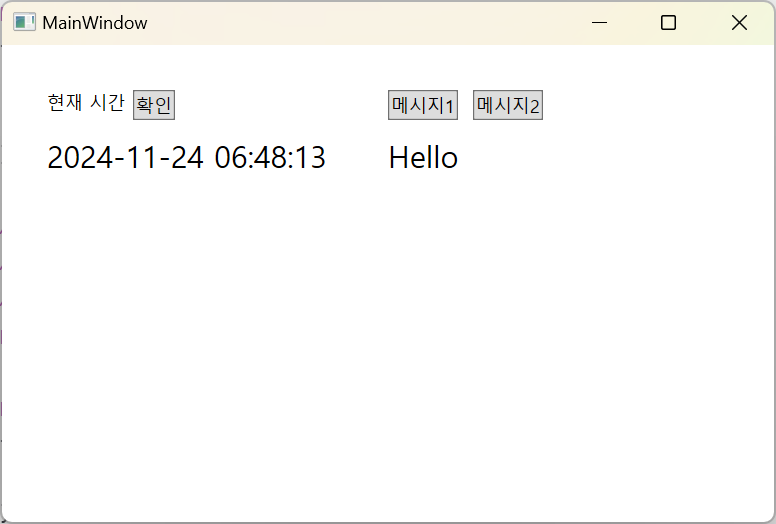
1. 확인 버튼 클릭 시 `DateTimeService`의 `GetDateTimeString`메서드가 호출되고, 현재 시간이 표시되는 것을 확인할 수 있다.
2. 메시지 버튼 클릭 시 `MessageService`의 `GetMessage` 메서드가 호출되고, 미리 정의한 메시지가 표시된다.
💡 예제 소스
https://github.com/elena-kim/wpf-study/tree/main/WpfStudy/PrismDependencyInjection
'.NET > WPF' 카테고리의 다른 글
| [WPF] InvokeCommandAction 사용 시 바인딩 업데이트 타이밍 문제 (0) | 2024.11.26 |
|---|---|
| [WPF] 의존성 주입 예제 (1) - Microsoft.Extensions.DependencyInjection 사용 (0) | 2024.11.18 |
| [WPF] 의존성 주입(Dependency Injection) (0) | 2024.11.15 |
| [WPF] 이벤트 라우팅, 버블링(Bubbling), 터널링(Tunneling) (1) | 2024.10.19 |


댓글